Key takeaways
- Link the inspection decision to an identifiable lot or movement.
- Keep held, released, rejected and rework quantities distinct.
- Require an authorised release rather than inferring approval from a completed form.
- Check the latest applicable status before dispatch allocation.
Putting this workflow into practice? Explore Automation Systems Architecture for implementation scope, controls, and next steps.
A factory quality hold should change what the dispatch team can promise. If an inspection decision lives only in a spreadsheet or chat message, stock can appear available while the people preparing a delivery do not know it is waiting for review. Automation should make that status and its decision owner visible at the point of action.
The scope here is inventory and workflow coordination around inspection results. Inspection methods, sampling decisions and acceptance criteria belong to the factory's qualified quality team. A software status records an authorised decision; it does not perform the physical inspection.
Choose the identity that follows the goods
Decide whether control operates by batch, lot, serial item, receipt line or production job. An item code alone is insufficient when two lots of the same material have different inspection outcomes. Carry that identity through receipt, storage, picking and any dispatch decision.
If goods are split or repacked, preserve the relationship between parent and child quantities. The team should be able to explain which portion was inspected and which portion a release applies to. Avoid copying a “passed” flag onto a new quantity without an approved relationship to the original evidence.
Define the status transitions
A suggested workflow distinguishes awaiting inspection, held, released, rejected and awaiting rework review. Agree which role can create each transition and what evidence it requires. A stored value is more useful when the operator can see who changed it and why.
| Transition | Evidence to require | Downstream action |
|---|---|---|
| Receipt to inspection queue | Receipt and lot reference | Exclude from usable allocation until the agreed decision |
| Inspection to release | Authorised result and accepted quantity | Make only that quantity eligible |
| Inspection to hold | Reason and next reviewer | Show a blocked dispatch dependency |
| Hold to rework | Approved rework instruction | Track movement without assuming later acceptance |
| Rework to release | New review result | Preserve both the earlier hold and the later decision |
These states are a proposed control model, not a claim that every state exists as a native Tally feature. Establish where the authoritative status will live before designing the screen.
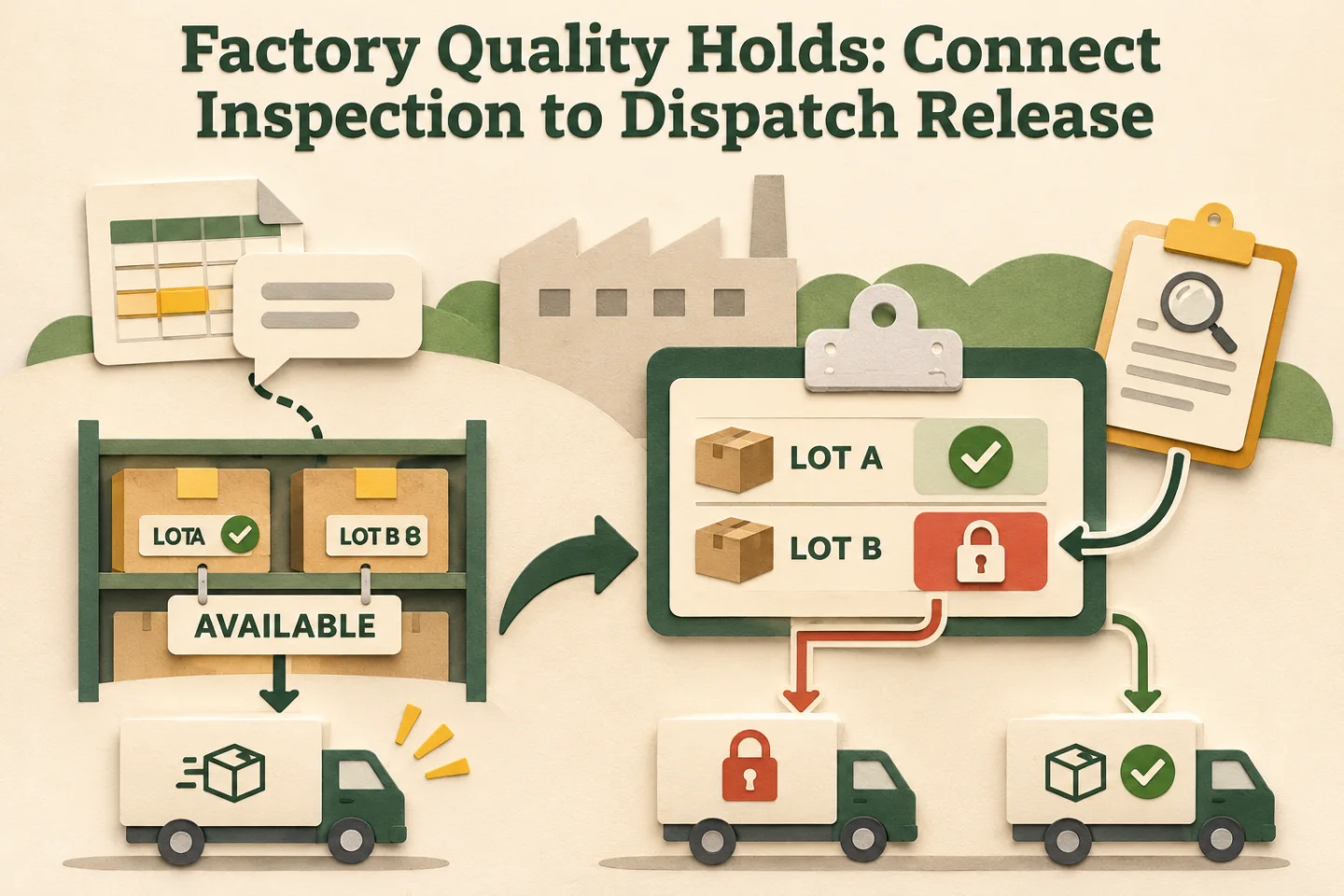
- Identify the lot
- Record the quality decision
- Recheck dispatch eligibility
- Preserve changed decisions
A visual map of this article’s approach. The detailed requirements and exceptions are explained in the surrounding sections.
Connect status with accounting inventory carefully
Tally's manufacturing guidance covers inventory movements and production records. Those records can support the quantity side of a factory process. The inspection decision and dispatch gate described here require a separately agreed model.
For example, locations may help distinguish physical storage, while an inspection register records the current release decision. A location label alone should not be treated as proof that the required inspection happened. Decide which evidence the dispatch workflow must consult.
Recheck eligibility when a dispatch is prepared
A pick list prepared in the morning may become stale after a later hold. Check the applicable lot status and quantity when allocating and again at the agreed dispatch checkpoint. Show which status version the decision used so the operator can identify a stale screen.
Define what happens when the status source is unavailable. The workflow should show that release could not be verified and route the decision to the responsible person. Silently using an old “released” value makes a temporary connection problem look like a current approval.
Handle partial acceptance and changed decisions
Consider an illustrative receipt of 100 pieces where the reviewer releases 80 and holds 20. Store the quantities with their decisions. A single item-level green flag would hide the difference and could allow the remaining 20 into a dispatch allocation.
If a decision changes after allocation, create an exception against the affected pick or shipment. Identify the responsible team and the material concerned. Do not automatically erase the earlier allocation: the physical goods may already have moved, and the recovery path depends on that fact.
Use TDL only for the part that belongs in Tally
A TDL customisation may capture an inspection reference, display a hold reason or support a purpose-built review view. Tally's UDF and validation reference documents mechanisms for extending stored information and entry controls. Their use still needs a precise design for the relevant objects and screens.
Do not assume a field check covers every entry route. If movements also arrive from imports or a separate application, verify those paths independently. The end-to-end acceptance test should follow the goods from the original receipt to the actual dispatch decision.
Track these separately. Evidence for one does not automatically confirm the others; use the article’s review and ownership checks.
Implementation work to scope
- Identify the lot and movement references used by receipt, quality and dispatch.
- Define status ownership, decision evidence and accepted quantity rules.
- Choose the authoritative inspection register and integration boundaries.
- Add visible dispatch dependencies and a process for changed decisions.
- Test unavailable data, partial release, split lots and rework with the actual users.
The deliverable is a working control path with clear responsibility. A coloured dashboard is useful only when operators know what to do with each unresolved row.
Pilot a complete hold and release cycle
Use one inbound lot and one production lot in a controlled pilot. Record an inspection, a partial release, an attempted allocation of held goods and a later rework decision. Ask dispatch to reconstruct the reason for each permitted or blocked action using the recorded evidence.
Measure time waiting for review and cases where allocation used an outdated decision. Read the exception-ownership guide for the handoff design. For a connected factory workflow, explore automation systems or share the inspection-to-dispatch process.
Frequently asked questions
Can physically available stock still be blocked from dispatch?
Yes. A quality hold is a separate restriction on the relevant lot or quantity. Dispatch should check the authoritative release status instead of relying only on a total inventory balance.
Who should be allowed to release held material?
Use an authorised decision owner with the inspection evidence and reason recorded. Preserve changes and partial releases so later dispatch decisions can be traced to the applicable status.
Related implementation guides

Founder, The Night Marketer (Shopify Select Partner). The agency has served 450+ brands since 2015.
Automation Systems Architecture
For teams where leads, orders, operations, or reporting still depend on memory, WhatsApp nudges, and manual sheet updates.