Find the actual constraint.
We start with the current workflow, the data that enters it, the people who touch it, and the point where useful work starts waiting.
Distribution Operations System
I build distribution operations systems that connect the buyer catalogue, commercial pricing, purchase orders, warehouse work and stock ledger. This offer draws on a distribution application my team built and tested, with separate admin, operator and buyer workspaces. We configure the modules around your business and prove the agreed flow before rollout.
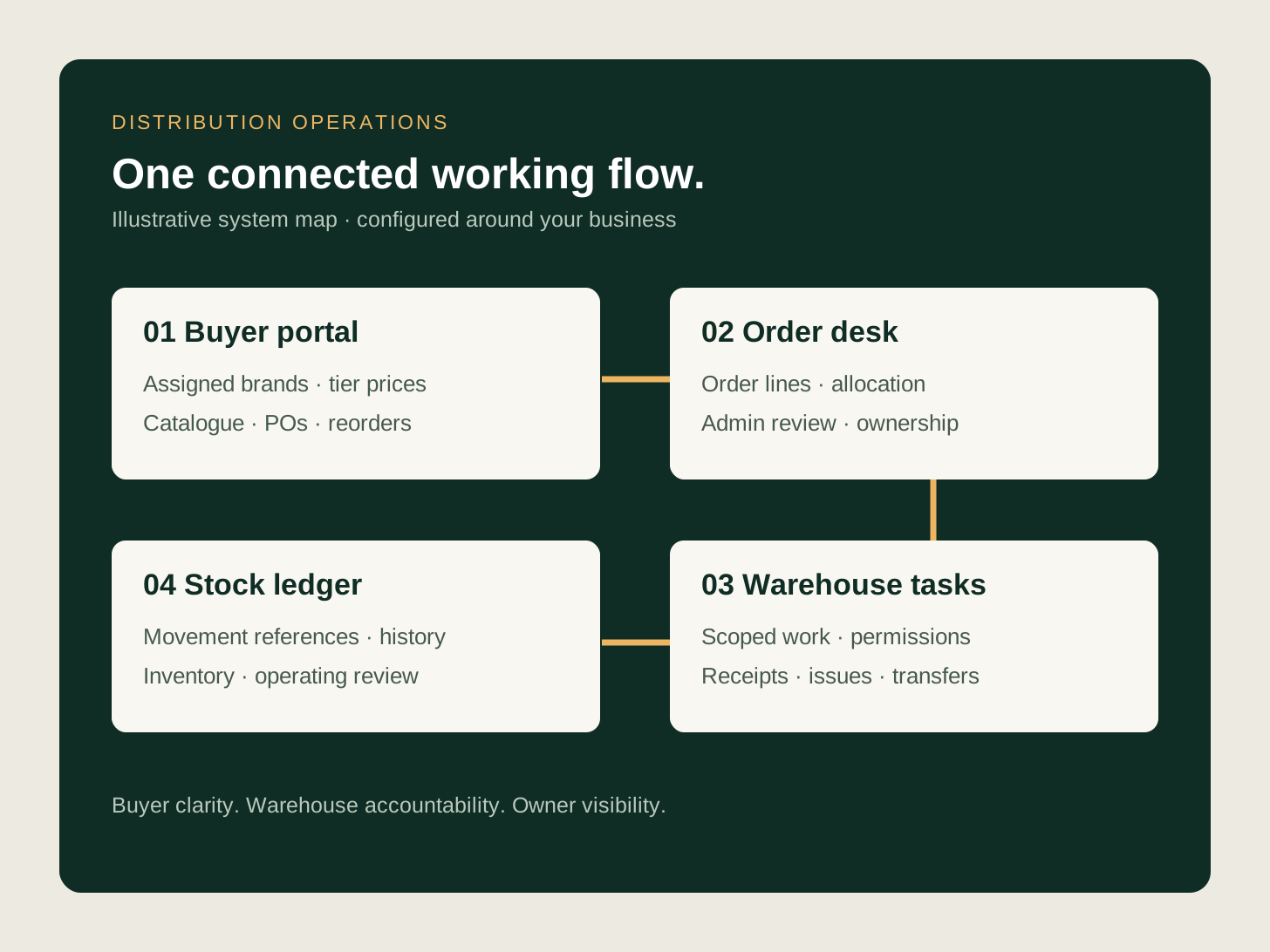
The distributor controls products, brands, customer access, tier prices and warehouse assignments. Buyers place purchase orders through their own portal. Admin allocates the work, warehouse users act within their permissions, and the movement history gives the owner a way to investigate stock changes.
Show assigned brands, applicable prices, product information, order history and reorder options.
Capture the buyer PO and quantities, then let admin assign order lines to warehouses.
Present assigned tasks and controlled stock operations without unnecessary customer commercial information.
Record receipts, issues and transfers with references; review orders, inventory and activity by role.
Illustrative design: a dealer requests 30 units of one product and 10 of another. The buyer submits one PO without choosing a warehouse. Admin allocates the lines, operators see the assigned work, and the stock ledger explains the relevant movements. The numbers are illustrative; the underlying catalogue, PO, assignment and ledger workflows come from our build. Production rollout and measured business results require separate acceptance.
In the application we built, product creation and stock creation are separate. The product master holds catalogue and commercial information. Warehouse quantities come from recorded stock events, so creating a SKU does not invent inventory.
The buyer ordering flow captures the commercial request while admin owns warehouse assignment. The operator task view can withhold customer identity while still providing the product and quantity needed for the work. These are concrete examples of the role boundaries we implemented and tested.
Configure brands, products, customer-to-brand tiers and the applicable price. A buyer needs the relevant assignment and price record to see a product in the catalogue. Include product specifications, documents, order history, acknowledgements and reorders in the agreed buying journey.
Agree what the buyer may see about availability, incoming quantities and lead time. A purchase request for an against-order item is different from a promise that physical stock is ready to dispatch.
Give admin a warehouse inventory view and a controlled stock desk. Give operators the warehouses and brands they are allowed to work on. Record movement references, operator, time, source details and applicable location information so a balance can be investigated.
Record transfer requests and approval decisions separately from confirmed stock movement. Scope partial-receipt, reminder and reporting requirements explicitly during discovery and demonstrate them in your target environment.
The build includes an operator CSV preview and commit flow, upload history, admin master imports and exports, role-specific analytics and activity review. A preview identifies invalid or unauthorised rows before a user confirms a stock change.
A new implementation includes representative test records, agreed permission checks, an operating checklist and deployment verification. Mail, backups, integrations and server scheduling are checked in the target environment before anyone relies on them.
This is a consultant-led software implementation. Scope, hosting, licence or ownership terms, ongoing support and release responsibility are agreed in the proposal. The pilot establishes the modules and business rules needed for your rollout.
Accounting integrations are a separate scope decision. We can assess a TallyPrime handoff, but the distribution case example does not claim a completed Tally or Zoho integration. Start with the ordering and stock records you need, then select the accounting boundary.
| Approach | Good fit | Check before committing |
|---|---|---|
| Buyer ordering pilot | Catalogue access, tier pricing, PO capture and reorder work. | Prove account visibility, price resolution and order validation with several buyer accounts. |
| Warehouse operations pilot | Stock visibility, operator tasks, ledger and transfer controls. | Reconcile one stock cycle and test role restrictions, pending transfers and exceptions. |
| Connected distribution build | Several warehouses, buyer ordering, imports and management review. | Agree record ownership, rollout stages, support and any accounting integration separately. |
Swipe sideways to see all columns.
Learn about The Night Marketer team and read its Shopify Partner Directory profile.
The pattern behind the request
Connect buyer catalogues, tier pricing, purchase orders, warehouse tasks and stock movements in one distribution application.
A clear path, not a black box
You stay close to the important decisions without becoming the project manager for every specialist. The process is deliberately practical: understand, shape, prove, hand over.
We start with the current workflow, the data that enters it, the people who touch it, and the point where useful work starts waiting.
The right path may be a cleaner process, a connector, a page change, a CRM rule, or a focused build. The design makes ownership and exceptions explicit.
We prove the important scenarios, document the operating rhythm, and leave your team with a system they can actually run.
What gets built
The implementation is shaped around how work needs to move in your business. That means decisions, exceptions, data quality, and team adoption get attention alongside the actual build.
We make the current state legible before deciding what deserves to change.
The rules, inputs, owners, and tools are arranged around the outcome rather than a generic template.
The build is checked against the real moments where work normally breaks down.
Your team gets the operating notes needed to keep the work moving after handover.
Your team gets the operating notes needed to keep the work moving after handover.
Your team gets the operating notes needed to keep the work moving after handover.
Your team gets the operating notes needed to keep the work moving after handover.

Direct access, execution depth
I diagnose the problem and stay responsible for the path to delivery. When the work needs design, engineering, SEO, automation, or specialist support, The Night Marketer team adds depth without making you coordinate the room.
Common questions
Yes. My team built and tested a distribution application with buyer, operator and admin workspaces, tier-based catalogue access, purchase orders, warehouse allocation, stock ledgers, transfers, imports and reports. The public example is anonymised and makes no claim about measured savings or the latest production release.
Yes. The build resolves product visibility and price from customer-to-brand tier assignments and the corresponding price records. We agree and test your exact commercial rules before rollout.
The implemented flow lets the buyer submit a PO without selecting a warehouse. Admin allocates the order lines, and warehouse users see the tasks assigned to them.
Accounting ownership and integration are scoped separately. This distribution build example does not claim completed Tally or Zoho integration. We first establish which records must cross the boundary and how they will be reconciled.
Bring a redacted product and price sample, one buyer PO, your warehouse list and a recent stock exception. We use those to scope a pilot, acceptance checks, deployment and support.
Keep exploring
These are practical reads for understanding the job, asking better questions, and spotting the risks that are easy to miss in a first call.