Key takeaways
- Define the business meaning of a field before choosing its screen position.
- Store information at the object level that matches its actual scope.
- Plan for historical data, copied vouchers and existing add-ons.
- Make custom fields useful in reports and reconciliation, not only entry screens.
Putting this workflow into practice? Explore Tally TDL Development & Customisation for implementation scope, controls, and next steps.
A useful Tally TDL job-card customisation starts with the decision the factory team needs to make. Adding a text box called “Job No.” is easy to request, but that field will not create reliable traceability unless its meaning, storage level and relationship to production movements are clear.
This is an implementation brief for customisation work. It describes the requirements to validate with a TDL developer and the factory's accounting team. The example fields are proposed design choices, not a claim that this specific job-card application is already installed or has produced client results.
Decide what the job card must connect
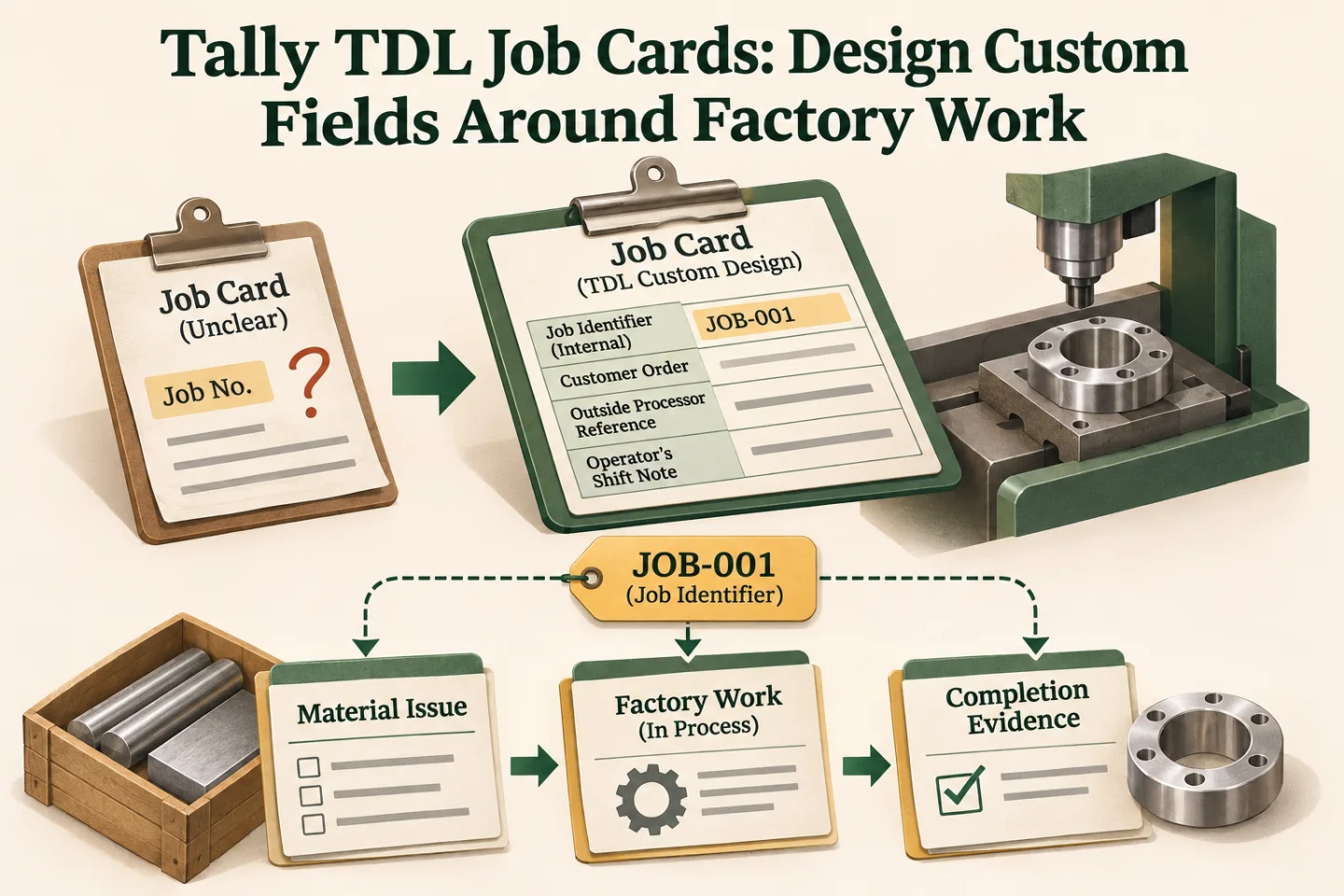
Begin with a sample job, its material issue and its completion evidence. Identify which stable reference connects them. Distinguish the internal job identifier from the customer order, outside processor reference and operator's shift note. They may all be useful, but they are not the same field.
Write a short definition for each value. Specify the person who supplies it, the source of permitted values and whether it can change after approval. A field whose meaning varies by operator will not become consistent because a developer stores it in Tally.
Choose the storage level deliberately
Tally's UDF reference describes storing additional information in existing internal objects. The design must identify which object owns the new value. A job reference applying to a whole voucher differs from an operation reference applying to one item allocation.
Tally's objects and collections guide provides the underlying object model. Ask the developer to show how each proposed value is retrieved in its intended context before accepting a screen mock-up as the finished design.
| Proposed information | Scope to decide | Question to resolve |
|---|---|---|
| Factory job reference | Voucher or inventory line | Can one voucher contain several jobs? |
| Operation identifier | Relevant production movement | Does the operation vary by item? |
| Inspection reference | Lot, receipt or linked decision | Which quantity does the reference cover? |
| Reviewer note | Approval event or document | Must earlier reasons remain visible? |
| External event identifier | Imported transaction mapping | How is a repeated submission recognised? |
- Define the job reference
- Choose field storage
- Validate data entry
- Test reports and copies
A visual map of this article’s approach. The detailed requirements and exceptions are explained in the surrounding sections.
Agree types, permitted values and defaults
Use a controlled list when the business has a maintained operation or department master. Use free text only where variation is intentional. Define maximum practical input length, blank handling and how a value should appear in exports and printouts.
A default should help the operator without making an unsupported assertion. Preselecting the current shift may be reasonable in a staffed workflow; preselecting an approval status would be a different decision. Preserve the ability to distinguish an explicitly entered value from a legacy blank when that matters.
Protect compatibility with existing customisations
Inventory the installed extensions before assigning storage identifiers. Keep a documented register of new UDF identifiers, types, object levels and the component that owns them. Reusing an identifier without understanding an existing add-on can attach the wrong meaning to stored values.
Plan what happens if a later version changes a field. A display-label change is different from changing a value's type or scope. Agree a migration or compatibility strategy before the live release rather than discovering that old reports interpret earlier records differently.
Make historical and copy behaviour explicit
Decide whether old vouchers remain blank, are backfilled from reliable evidence or are marked as not captured. Do not invent job references for historical transactions merely to make a required-field report appear complete. The chosen treatment should be visible to reviewers.
Test voucher duplication and alteration. An external transaction identifier should not automatically become the identity of a copied business event. A copied job reference may be useful for some workflows and incorrect for others; the requirement needs to say which behaviour is intended.
Include reports and integrations in the brief
Define at least one report that consumes each important field. A job reference might support an outstanding-material view, while an inspection reference supports a dispatch review. Show the record-level evidence behind every total rather than displaying an untraceable text column.
Where another system reads or writes the field, document the supported exchange format and mapping. The broader Tally integration guide can help separate customisation inside Tally from orchestration outside it.
Track these separately. Evidence for one does not automatically confirm the others; use the article’s review and ownership checks.
Implementation work to scope
- Create a field dictionary with examples from one factory job.
- Confirm the storage level, identifiers, types and ownership with the developer.
- Define entry, copy, alteration and historical-record behaviour.
- Specify the reports and exchange mappings that use the values.
- Pilot in a test company and compare stored values with the source evidence.
A useful acceptance pack contains sample records and expected results, including blanks and corrections. It should let the factory explain the field without needing the person who first requested it.
Verify the operator journey before rollout
Ask an operator to enter a job, correct a permitted value and find the same reference in the relevant report. Ask a reviewer to locate a historical blank and understand why it is blank. Repeat the exercise with another company and the real set of installed add-ons.
Measure whether users can follow the job across its records and whether missing information reaches the correct owner. For a related stock use case, review Tally multiple-godown inventory. Explore GST and Tally automation or send the field and report requirements to scope the TDL work.
Frequently asked questions
What should be specified before adding a TDL job field?
Define its meaning, permitted values, object level, storage identifier, owner and reporting use. Review existing add-ons before assigning storage so another customisation is not given a conflicting meaning.
How should custom fields behave on copied or historical vouchers?
Agree whether a copied value should remain and how older blanks are represented. Test duplication and alteration; do not invent historical references merely to make a required-field report appear complete.

Founder, The Night Marketer (Shopify Select Partner). The agency has served 450+ brands since 2015.
Tally TDL Development & Customisation
I scope and deliver Tally Definition Language customisations around the way your accounts and factory teams actually work. That can include a job reference on a voucher, an entry check, a job-work report or a dispatch print. We start by checking native configuration, define the saved record behind each field, and test the change alongside existing add-ons before rollout.