Key takeaways
- Queue approved work without assuming the destination is always online.
- Verify uncertain outcomes before another create request.
- Record manual fallback against the same source document identity.
Putting this workflow into practice? Explore GST & Tally Automation for Delhi NCR Businesses for implementation scope, controls, and next steps.
Tally integration needs a recovery plan for the ordinary moment when the accounting computer is unavailable. The machine may be shut down, the company may not be open, the network may fail, or an update may interrupt the connection. A reliable workflow keeps those events from becoming lost or duplicated work.
The central idea is to separate receiving a business document from confirming its accounting outcome. Store approved work durably, process it through a controlled connection, and reconcile the result before marking it complete.
Define the connection boundary
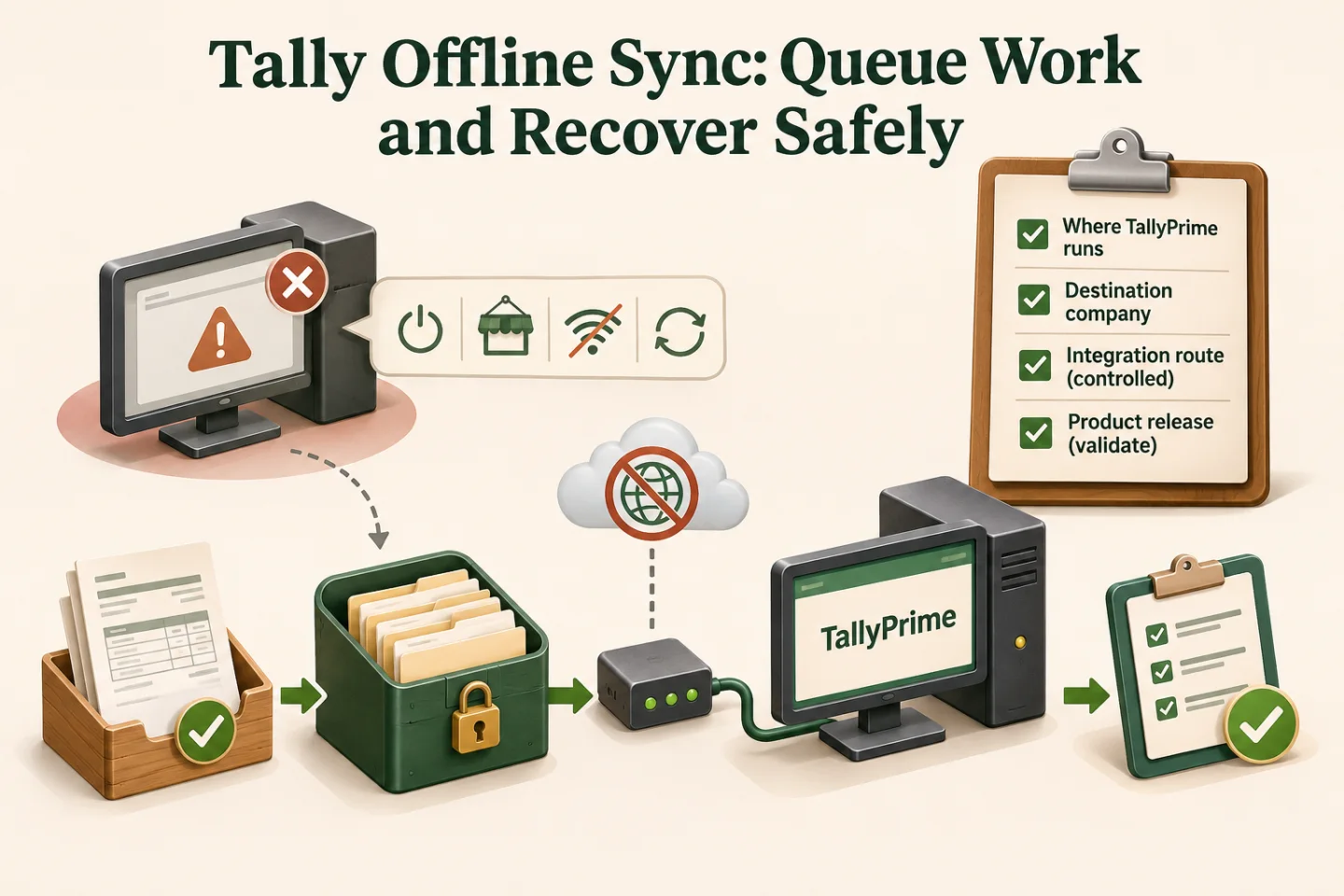
Document where TallyPrime runs, which company is the destination, and how the integration reaches it. Tally's integration prerequisites describe product setup for supported integration. Validate the exact route and release in your environment.
Do not expose an accounting endpoint directly to the public internet to make a cloud workflow convenient. Use an appropriately secured network or connector architecture, restricted credentials, and an owner responsible for maintaining the connection.
Decide operating hours. If accounts deliberately closes the workstation overnight, the automation should show a planned wait rather than generate an incident every few minutes. Unplanned downtime during the expected processing window needs a different alert.
Keep a durable queue of approved operations
Each queued operation should identify the source document, destination company, approved revision, mapping version, and current processing state. Store the source reference and confirmation evidence separately from temporary worker execution details.
| Queue state | Meaning | Recovery behaviour |
|---|---|---|
| Waiting | Approved work has not been attempted | Process when the destination is ready |
| Processing | A worker owns the operation | Prevent simultaneous handling |
| Confirmed | Destination result has been verified | Do not create it again |
| Uncertain | Connection failed around submission | Inspect destination before retry |
| Needs review | Data or policy prevents processing | Assign a business owner |
Set limits on queued volume and age, and alert before the backlog becomes a month-end surprise. A durable queue prevents loss, but it does not make an indefinitely growing backlog healthy.
- Record approved queued work
- Check destination readiness
- Reconcile uncertain outcomes
- Drain the backlog safely
A visual map of this article’s approach. The detailed requirements and exceptions are explained in the surrounding sections.
Check readiness before draining the backlog
A network connection alone does not prove the correct Tally company is available. Verify the intended destination context and required integration capabilities before processing. A workstation with another company open should not accidentally receive the queued transactions.
Check whether mappings or source documents changed during downtime. If the approved revision is no longer current, route the operation for review under the change policy. Do not silently combine an old approval with newly fetched values.
Process at a controlled rate after reconnection. Sending every waiting document at once can make the destination unstable and produce more uncertain outcomes. Start with a small batch, confirm the results, and increase only within the tested capacity.
A fictional afternoon outage
Imagine the accounts workstation goes offline after 18 of 30 queued documents have been confirmed. One request was in progress when the connection disappeared. Eleven were never attempted. The correct recovery set has three groups, not 12 identical failures.
The 18 confirmed operations remain complete. The uncertain operation is checked against the destination using the agreed reference and values. The eleven untouched operations wait for readiness and then proceed normally. This example illustrates recovery logic, not a measured client outcome.
If the uncertain document exists but differs, stop for finance review. If the integration cannot establish whether it exists, assign a manual verification task. Repeatedly submitting a create request is not a substitute for knowing the current state.
Coordinate manual fallback
Accounts may need to enter urgent work manually during an outage. Define how those manual entries are recorded against the same source identities used by the integration. Otherwise the returning connection may create them again.
A fallback log should capture the source document, destination reference, operator, time, and reason. The recovery process verifies that evidence and marks the operation handled. Avoid a blanket "skip today's queue" instruction that hides unrelated missing work.
Decide who can pause and resume processing. The controls should be available to an authorised operator with a clear runbook, not only to the developer who originally built the integration. Keep sensitive credentials out of that runbook.
Reconcile after every recovery
Compare source operations with confirmed destination outcomes, then check counts and relevant financial totals. Inspect unresolved and conflicting records separately. A queue reaching zero is not proof of success if items were cancelled or skipped without explanation.
Keep the outage window, attempted operations, recovery actions, and reconciliation result together. That record helps explain differences in processing time and provides evidence for improving the connection or operating schedule.
For imports, Tally's JSON/XML import guide is the product reference. Do not assume a particular connector returns every confirmation you need; test the actual response and destination lookup behaviour before relying on it.
Track these separately. Evidence for one does not automatically confirm the others; use the article’s review and ownership checks.
Rehearse the failure before going live
Keep a short recovery checklist beside the operator's normal workflow. It should name the intended company, the last confirmed operation, the uncertain set, and the person authorised to resume processing after reconciliation.
Test the destination unavailable before processing, a connection loss during submission, a worker restart, a wrong-company response, and a manual entry made during downtime. Include a source correction while the operation waits.
Acceptance should include a demonstrated recovery with no unexplained duplicates and a reconciled destination. Measure oldest waiting work, uncertain outcomes, recovery duration, and repeated downtime. Those numbers help distinguish a software problem from an unrealistic operating-hours assumption.
Read the Tally integration methods guide, explore GST/Tally implementation support, and describe your current connection setup. A small, rehearsed offline-recovery pilot is a better starting point than promising that the accounting computer will never disconnect.
Frequently asked questions
What should happen when the Tally destination is offline?
Keep approved operations in a durable queue with their identities and states. Show the outage and pending work to an owner instead of losing the source event or reporting unverified success.
How should the backlog resume after connectivity returns?
Check company readiness, mappings and any controlled manual fallback first. Process the eligible backlog with duplicate checks and confirm destination results before marking it complete.
Related implementation guides
- Tally Integration: Choosing ODBC, XML, JSON and TDL
- Tally Live Automation: Connect Business Systems Reliably

Founder, The Night Marketer (Shopify Select Partner). The agency has served 450+ brands since 2015.
GST & Tally Automation for Delhi NCR Businesses
I build GST and Tally automation workflows for businesses in Delhi NCR and across India. The work can connect Shopify, marketplaces, billing tools, spreadsheets, CRM, Tally or TallyPrime, and finance review queues with explicit controls for approvals and exceptions.