Key takeaways
- Separate retryable payment failures from cases needing customer action.
- Keep payment recovery, subscription state and fulfilment decisions distinct.
- Measure recovery by a defined cohort instead of counting retry attempts.
Putting this workflow into practice? Explore Shopify Subscription Growth for implementation scope, controls, and next steps.
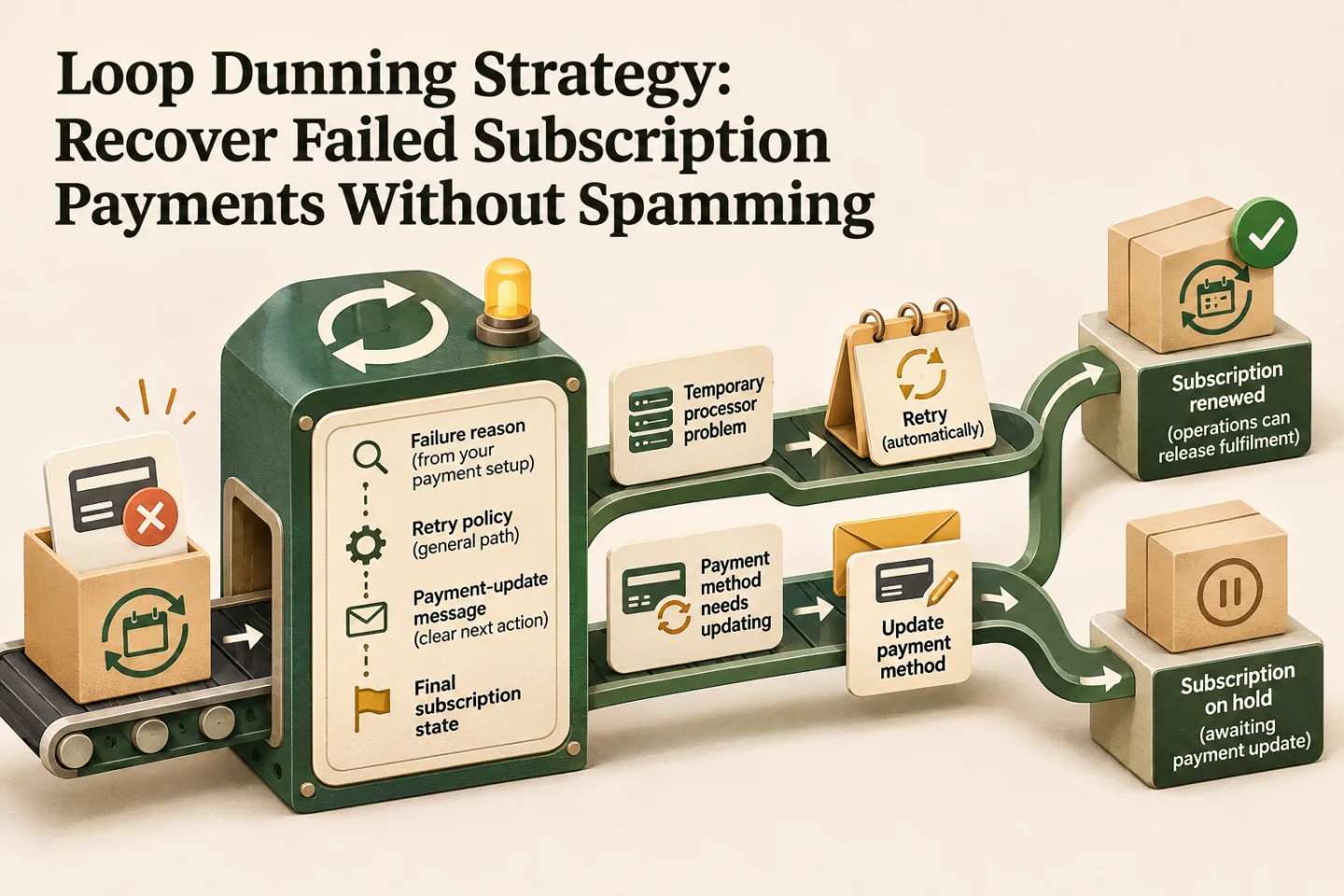
Dunning is the recovery process after a subscription payment fails. A useful Loop workflow connects the failure reason, retry policy, payment-update message and final subscription state. The customer should know what action is needed, and the operations team should know whether a renewal is paid before releasing fulfilment.
Separate retryable failures from customer action
A temporary processor problem and a payment method that needs updating should not receive identical treatment. Start with the reasons exposed by your payment setup, then define a general recovery path and the exceptions it supports. Do not infer fraud or blame the customer from an unfamiliar error code.
Loop documents recovery through retries and general and advanced recovery strategies. The latter can route matching failure reasons into a specific strategy. Check the controls actually available in your account, payment provider and plan before designing around them. Retry frequency and the final action should follow the verified configuration, not an arbitrary schedule copied from a blog.
| Situation | Decision to define | Evidence before the next action |
|---|---|---|
| Temporary failure | Whether and when to retry | Recorded reason and current recovery state |
| Payment update required | Secure update path and reminder | Customer can access the approved payment-update page |
| Successful recovery | Stop reminders and resume the right workflow | Confirmed successful payment and correct renewal |
| Retries exhausted | Pause, cancel or escalate according to policy | Final retry outcome and customer communication |
| Conflicting state | Human review | Payment, subscription and order records reconciled |
Write a message that helps the subscriber act
A useful first message identifies the subscription, explains that its renewal payment did not complete, and provides a secure way to update the payment method. State what happens next in terms that match the store's actual policy. Do not ask the subscriber to send card details by email, chat or a form you created for support.
An illustrative draft is: “We could not complete the payment for your next subscription order. Please review your payment method using your secure account link. Your account shows the current renewal status; contact support if you need help.” Add a specific next-attempt or pause date only when the integration reliably supplies it. A placeholder left unresolved is worse than omitting an uncertain date.
Set a communication limit across channels. If email, SMS and WhatsApp tools all react to the same failure, the customer can receive several messages for one event. Give one system responsibility for the recovery sequence, log the messages sent and suppress future reminders as soon as the authoritative payment state changes. Check channel consent and provider rules separately from the retry configuration.
- Classify the failed payment
- Choose retry or customer action
- Preserve order state
- Review recovery by cohort
A visual map of this article’s approach. The detailed requirements and exceptions are explained in the surrounding sections.
Protect order and fulfilment state
A payment-update link click does not prove a payment succeeded. A support agent saying “customer replied” does not prove a renewal is paid. Trigger the next operational step from a verified payment outcome and the correct subscription cycle. If events arrive late or twice, avoid creating duplicate orders or resuming an already cancelled cycle.
Record subscription ID, renewal/cycle reference, payment attempt, outcome time and the downstream action. When those records disagree, route a case to an owner rather than continuing automatically. Our Shopify CRM ownership guide explains how to keep customer support context connected to the order system. The shipping exception workflow covers the handoff once an order is ready to fulfil.
Measure a cohort, not a pile of retries
Use failed renewal cycles as the denominator for cycle recovery rate. If 100 distinct failed cycles produce 25 recovered payments, the cycle recovery rate is 25%. If those cycles required 240 retry attempts, 25 divided by 240 measures success per attempt, which answers a different question. These figures are hypothetical arithmetic, not a claim about Loop or a client's results.
Track recovered revenue separately: a small recovered order and a large one have different value. Also record time to recovery, unresolved cycles, cancellations after reminders, support cases and messages per recovered cycle. Loop's payment analytics documentation explains its reporting views. Confirm each metric's definition before combining platform reports with a spreadsheet.
Compare cohorts that have had the same time to recover. A group whose first failure was yesterday has not had the same opportunity as a group from three weeks ago. Note promotions, customer mix and payment-provider changes when comparing results. Avoid attributing all recovered revenue to a new message if retry settings changed at the same time.
Track these separately. Evidence for one does not automatically confirm the others; use the article’s review and ownership checks.
Test before expanding the workflow
Test a temporary failure, an update-required case, successful recovery, exhausted retries and a customer cancellation during recovery. Check the message, account page, CRM record and fulfilment state for each. Confirm that a successful recovery stops queued reminders, a duplicate event does not duplicate a renewal, and a failed integration creates a visible support task.
Start with a narrow configuration and review exceptions before adding advanced segmentation. Discounts can change recovery economics; they should be a deliberate commercial decision rather than the default response to every failure. Keep a record of who owns payment recovery and how the team can pause the automation if messages or orders become inconsistent.
For a measured subscription-to-support workflow, see Shopify automation. Contact Raghav with an anonymised failed-renewal journey and the systems involved so the recovery and fulfilment rules can be scoped together.
Frequently asked questions
Should every failed subscription payment receive the same retry sequence?
Classify the failure and distinguish retryable conditions from cases needing customer action. Agree the supported app behaviour and keep order and fulfilment states consistent with the actual payment result.
What should a failed-payment message help the subscriber do?
Explain the issue and the relevant next step, such as reviewing payment details through the supported portal. Suppress outdated reminders after recovery and measure accepted recoveries by cohort rather than retry count.

Founder, The Night Marketer (Shopify Select Partner). 12+ years of experience and 450+ brands served since 2015.
Shopify Subscription Growth
I help Shopify brands build subscription programmes that customers keep. That covers choosing between Shopify Subscriptions, Recharge, Loop, Skio and similar apps, designing the subscribe-and-save offer, fixing the customer portal and cancellation flow, recovering failed payments, and migrating subscribers between apps without losing them. The Night Marketer team handles implementation.