Key takeaways
- A data match is not an automatic tax-eligibility decision.
- Use observable exception reasons and named owners.
- Keep original values alongside normalised comparisons.
Putting this workflow into practice? Explore GST & Tally Automation for Delhi NCR Businesses for implementation scope, controls, and next steps.
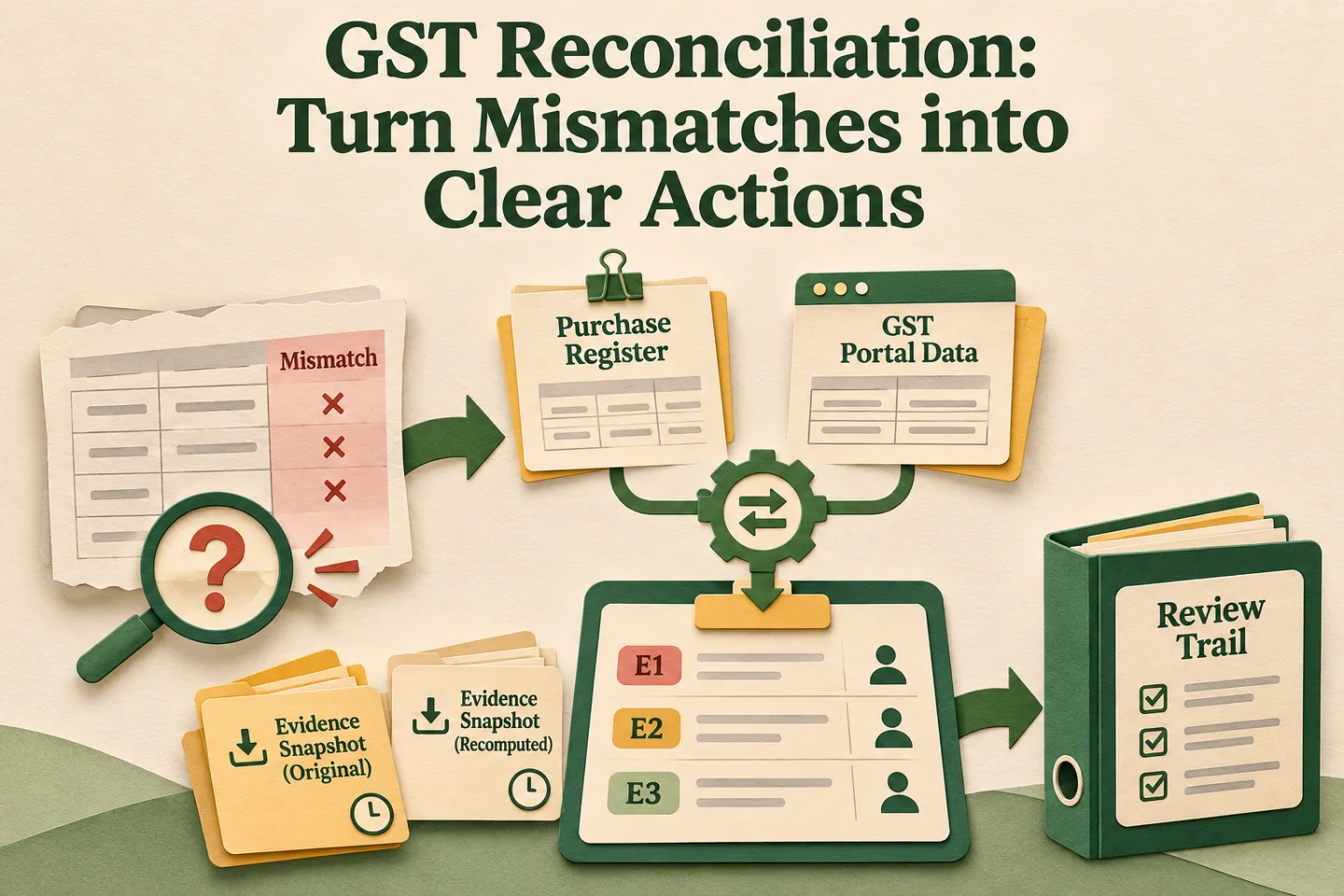
GST reconciliation automation is most useful when it explains why records do not match. A spreadsheet with one red "Mismatch" column leaves the accounts team doing the diagnosis manually. A small set of exception codes turns that same comparison into an organised work queue.
The goal is not to let software decide input tax credit eligibility. It is to compare evidence consistently, identify the next responsible person, and preserve the review trail. Tax treatment and filing decisions remain with your authorised finance team or CA.
Separate matching from tax decisions
Start with the purchase register and the relevant GST portal data for the correct registration and period. Preserve the original downloads and their retrieval times. If portal data is recomputed or downloaded again, treat it as a new snapshot rather than silently replacing the evidence used for an earlier review.
The GST portal's GSTR-2B advisory explains the statement's supplier-data basis. Read it alongside current IMS guidance and portal advisories; older descriptions of statement timing should not become hard-coded assumptions in a new integration.
A matched record means specified fields agree under your approved comparison rules. It does not, by itself, establish that every legal condition for claiming credit has been satisfied. Keep the matching result separate from the finance review conclusion in your database and reports.
Build a compact exception vocabulary
Use codes that describe observable differences, not accusations. "Supplier missing" may be misleading when the issue is a different document number or snapshot date. Prefer a label that tells the reviewer exactly what the comparison found.
| Code | What the system observed | First reviewer |
|---|---|---|
| BOOK_ONLY | Document appears only in the purchase register | Accounts payable |
| PORTAL_ONLY | Document appears only in the portal snapshot | Accounts payable |
| VALUE_DIFF | Candidate document has different amounts | Accounts reviewer |
| ID_AMBIGUOUS | More than one plausible document match | Data owner |
| REGISTRATION_DIFF | Registration identity does not agree | Master-data owner |
| PERIOD_REVIEW | Evidence may belong to another review period | Finance lead |
Allow several observations on one record, but select one primary work reason. Otherwise a single invoice can create three tickets for different people, each unaware of the other investigation. Preserve secondary flags inside the same case.
- Describe the observed difference
- Select a useful exception code
- Assign a next action
- Preserve the reviewed resolution
A visual map of this article’s approach. The detailed requirements and exceptions are explained in the surrounding sections.
Normalise carefully and keep the originals
Trimming surrounding spaces can help comparison. Removing every slash, dash, and leading zero without checking the supplier's numbering scheme can collapse two different invoice references into one. Keep both the original value and the normalised comparison value.
Define candidate matching separately from confirmed matching. A similar reference and identical amount can suggest a candidate, but that is not enough to auto-approve a match when two invoices share those characteristics. Ambiguous candidates should remain visible for review.
Tolerance rules also need ownership. If accounts approves a rounding tolerance, record the currency precision, which fields it applies to, and who authorised it. Do not use a broad percentage tolerance that hides material tax differences behind a high overall match rate.
An illustrative investigation
Suppose a purchase register contains invoice AB/041, while a portal snapshot contains AB-041. Amounts and supplier identity agree. A second portal document, AB041, has the same amount. A rule that strips punctuation now finds two candidates.
The correct automation outcome is an ambiguity case, not a confident green tick. The reviewer opens the original invoice and source records, confirms the intended match, and records the reason. The system retains the rejected candidate so another operator does not repeat the investigation next month.
If the investigation reveals a source-entry mistake, correct it through the approved accounting process. Do not rewrite the preserved portal file or invoice image to make the comparison look clean. Evidence and corrected working data have different roles.
Give every exception a next action
A useful case includes the registration, period, source document links, comparison values, primary reason, owner, due date, and latest note. It should also show whether somebody has already contacted the vendor. This prevents multiple team members sending conflicting requests.
Define clear outcomes: resolved with evidence, awaiting internal correction, awaiting supplier response, or awaiting finance decision. "Closed" without a reason is not enough. If a later snapshot changes the match, reopen or supersede the case with a visible link to the earlier conclusion.
Escalate by age and business relevance, not just row count. A long-running unresolved document may deserve attention even when most of the month's records match. Share exception summaries without exposing one vendor's invoice details to another vendor.
Measure the workflow honestly
Track exact matches, reviewed matches, unresolved exceptions, and time to resolution separately. Combining them into a single "automation success" percentage can hide how much human effort is still required. Also track repeated root causes by source system and supplier.
For example, if many cases come from inconsistent invoice references entered internally, improve the capture form and validation. If many come from missing purchase records, investigate the document intake process. Neither problem is solved by making fuzzy matching more permissive.
Test with duplicates, amended documents, multi-line invoices, and snapshots taken at different times. Ask your finance reviewer to predict the expected result for each test before configuring the rule. That gives the implementation an acceptance standard beyond "the report runs."
Track these separately. Evidence for one does not automatically confirm the others; use the article’s review and ownership checks.
Start with one registration and period
Pilot the exception codes on a controlled sample before extending them across the business. Review the categories after the first cycle and merge labels that lead to the same action. Add new codes only when they help a person make a different decision.
For the broader process, read GST automation for small businesses. For implementation, explore GST and Tally automation and send a redacted example of your reconciliation problem. A useful starting deliverable is an exception report your accounts team can actually work through.
Frequently asked questions
What should a GST reconciliation exception code explain?
It should describe the observed difference and route the next investigation. Keep the reason, owner, evidence and approved treatment separate so the code does not become an unsupported tax conclusion.
Can invoice numbers be normalised without preserving the originals?
Keep raw and comparison values separately. Removing punctuation or leading zeros can collapse different identities; flag collisions and ambiguous matches for document review.
Related implementation guides
- GST Credit Notes and Refunds: Reconcile the Full Flow
- GSTR-2B Reconciliation: Purchase Register to Reviewed ITC

Founder, The Night Marketer (Shopify Select Partner). 12+ years of experience and 450+ brands served since 2015.
GST & Tally Automation for Delhi NCR Businesses
I build GST and Tally automation workflows for businesses in Delhi NCR and across India. The work can connect Shopify, marketplaces, billing tools, spreadsheets, CRM, Tally or TallyPrime, and finance review queues with explicit controls for approvals and exceptions.