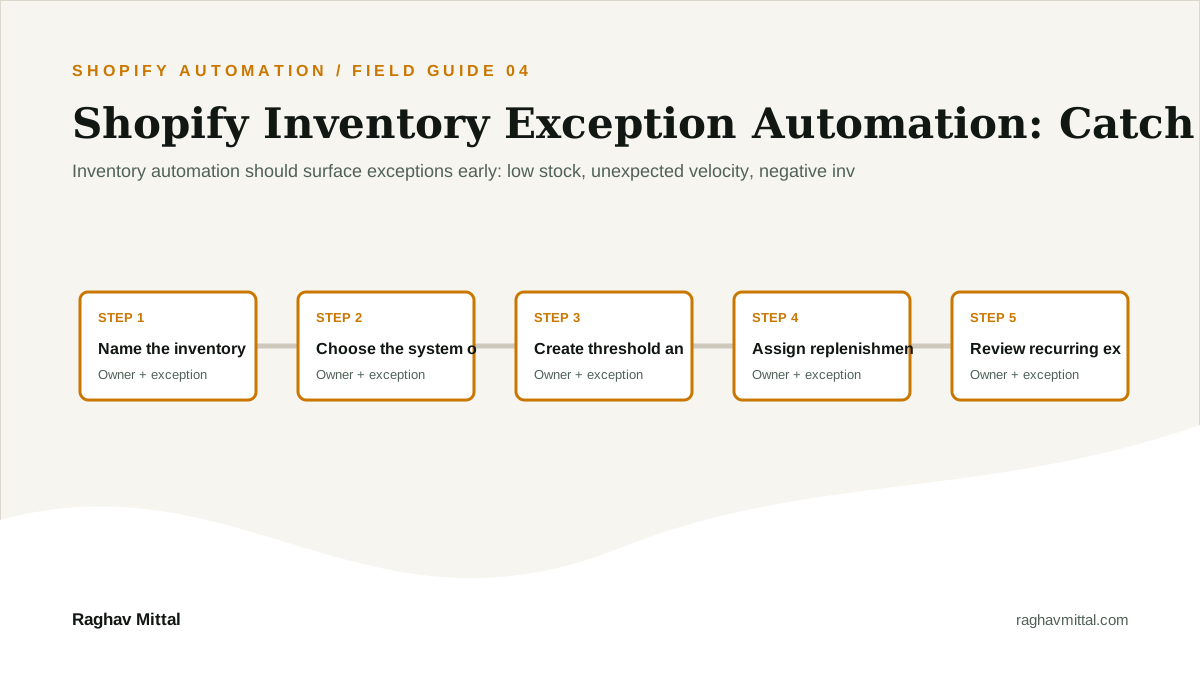
Inventory automation should surface exceptions early: low stock, unexpected velocity, negative inventory, inactive bundle components, and mismatches between systems.
That is the short answer. The practical work begins by translating the promise into a journey the customer can understand and a workflow the team can operate. This guide is written for merchants reducing overselling, stockouts, and manual inventory chasing.
Why this matters now
Shopify automation creates leverage when it connects a real store event to a controlled operational response. Shopify Flow uses triggers, conditions, and actions, while connectors can move work into supported external services. The operating design still matters more than the canvas.
The strongest workflows make exceptions visible. They do not simply move data; they clarify ownership, reduce response time, and leave enough evidence for an operator to understand what happened.
The useful question is not whether a feature exists. It is whether the feature fits your catalog, customer expectation, margins, team ownership, data, and failure recovery. A technically valid setup can still create a poor customer experience or a costly back office.
Diagnose the current system before changing tools
Start with one real customer or order journey. Follow it from the first signal through every system, person, decision, and exception. Use evidence from the store, support inbox, operations team, and financial outcomes instead of relying on the intended process.
- What exact customer or business problem should this change solve?
- Which data is trusted, and which system is the source of truth?
- Who owns normal execution, and who handles an exception?
- Which promise, margin, privacy, or compliance rule must never be violated?
- What baseline will prove the new setup is better?
Write the answers in plain language. If the team cannot agree on them, implementation should pause. That disagreement is useful evidence that the process needs design before it needs another app or workflow.
The implementation playbook
1. Name the inventory exceptions that matter
This step turns the strategy into an operating decision. Write down the input, the person responsible, the expected action, and the exception that should stop the workflow. For shopify inventory automation, vague ownership is usually more expensive than a missing feature.
Test the rule with normal cases, incomplete data, duplicate events, and a realistic failure. Keep the first version narrow enough that the team can explain it. Use Stockout incidents as one signal that the step is creating business value rather than merely producing activity.
2. Choose the system of record for stock
This step turns the strategy into an operating decision. Write down the input, the person responsible, the expected action, and the exception that should stop the workflow. For shopify inventory automation, vague ownership is usually more expensive than a missing feature.
Test the rule with normal cases, incomplete data, duplicate events, and a realistic failure. Keep the first version narrow enough that the team can explain it. Use Oversold order count as one signal that the step is creating business value rather than merely producing activity.
3. Create threshold and velocity alerts
This step turns the strategy into an operating decision. Write down the input, the person responsible, the expected action, and the exception that should stop the workflow. For shopify inventory automation, vague ownership is usually more expensive than a missing feature.
Test the rule with normal cases, incomplete data, duplicate events, and a realistic failure. Keep the first version narrow enough that the team can explain it. Use Time to resolve stock mismatch as one signal that the step is creating business value rather than merely producing activity.
4. Assign replenishment or catalog actions
This step turns the strategy into an operating decision. Write down the input, the person responsible, the expected action, and the exception that should stop the workflow. For shopify inventory automation, vague ownership is usually more expensive than a missing feature.
Test the rule with normal cases, incomplete data, duplicate events, and a realistic failure. Keep the first version narrow enough that the team can explain it. Use Revenue protected by replenishment as one signal that the step is creating business value rather than merely producing activity.
5. Review recurring exceptions by SKU and location
This step turns the strategy into an operating decision. Write down the input, the person responsible, the expected action, and the exception that should stop the workflow. For shopify inventory automation, vague ownership is usually more expensive than a missing feature.
Test the rule with normal cases, incomplete data, duplicate events, and a realistic failure. Keep the first version narrow enough that the team can explain it. Use Stockout incidents as one signal that the step is creating business value rather than merely producing activity.
Common mistakes to avoid
- Automating an undefined process. Record the consequence, the owner, and the prevention or fallback so the same failure does not become recurring manual work.
- Using tags without a naming system or owner. Record the consequence, the owner, and the prevention or fallback so the same failure does not become recurring manual work.
- Ignoring connector permissions and failure states. Record the consequence, the owner, and the prevention or fallback so the same failure does not become recurring manual work.
- Measuring workflow runs without measuring the business outcome. Record the consequence, the owner, and the prevention or fallback so the same failure does not become recurring manual work.
A controlled pilot is cheaper than repairing a broad rollout. Start with one product group, one workflow, one segment, or one customer journey. Keep a manual fallback until the evidence shows the new system handles normal and exceptional cases reliably.
How to measure whether it is working
Choose one primary commercial outcome, one customer-experience measure, one operational measure, and one guardrail. Review the measures together; a conversion lift that creates margin loss, support load, failed renewals, or fulfillment errors is not a clean win.
| Metric | How to operate it |
|---|---|
| Stockout incidents | Define the source, reporting frequency, baseline, target, and person responsible for acting when this moves. |
| Oversold order count | Define the source, reporting frequency, baseline, target, and person responsible for acting when this moves. |
| Time to resolve stock mismatch | Define the source, reporting frequency, baseline, target, and person responsible for acting when this moves. |
| Revenue protected by replenishment | Define the source, reporting frequency, baseline, target, and person responsible for acting when this moves. |
A focused 30-day rollout
- Week 1: Baseline and map. Document the current journey, owners, data, failure points, and the four baseline metrics above.
- Week 2: Configure and test. Build the smallest complete version, test realistic cases, and document the manual fallback.
- Week 3: Controlled release. Launch to a limited product group, segment, market, or internal team and watch every exception.
- Week 4: Review and standardize. Compare results with the baseline, fix failure patterns, train owners, and decide whether to expand, revise, or stop.
This sequence protects the team from app-first implementation. It also creates a clean decision record: why the system exists, what it is expected to change, who owns it, and what evidence justifies more investment.
Frequently asked questions
What is the best place to start with shopify inventory automation?
Start with one high-friction customer or operating journey, establish a baseline, and implement the smallest complete change with a named owner and fallback.
Which metrics should a Shopify team track?
Track Stockout incidents, Oversold order count, Time to resolve stock mismatch, and Revenue protected by replenishment. Review customer, margin, and operational guardrails together.
Do I need custom development?
Not always. Shopify Automation can often begin with native or app configuration. Custom development is justified when the required journey, data rules, integrations, controls, or scale cannot be delivered reliably with the existing stack.
Primary documentation reviewed
Platform capabilities and compatibility can change. Review the current official documentation before implementation, especially for payment, checkout, selling-plan, inventory, privacy, and plan-specific behavior.
The bottom line
Inventory automation should surface exceptions early: low stock, unexpected velocity, negative inventory, inactive bundle components, and mismatches between systems. Start with the operating decision, test the full customer and back-office journey, and measure the result against a real baseline. That is how Shopify Automation becomes durable leverage instead of another layer the team has to remember.
Automation Systems Architecture
For teams where leads, orders, operations, or reporting still depend on memory, WhatsApp nudges, and manual sheet updates.