If you are searching for ai agent security checklist, the real question is usually not “which tool should I buy?” The better question is: what business decision, workflow, or customer moment is currently slower than it needs to be?
Short answer: AI agent security requires narrow permissions, logging, rate limits, approval gates, data boundaries, rollback paths, and a kill switch.
Automation confidence comes from knowing how the system fails. This is why consulting, CRO, software, Shopify, and AI-agent work should begin with diagnosis. A rushed build can look impressive and still fail to move revenue, reduce workload, or improve customer trust.
In my work with founder-led teams, the most useful projects usually start with a very unglamorous discovery: someone is manually holding the business together. They remember which lead needs follow-up, which Shopify order needs checking, which spreadsheet is correct, which proposal has gone cold, or which dashboard cannot be trusted. That hidden coordination work is where the opportunity usually sits.
What the searcher is really trying to solve
The surface keyword points to a practical constraint: a founder wants traction, a team wants fewer manual handoffs, or a manager needs clearer proof before approving more budget. The page, workflow, or system has to answer that constraint directly. Generic advice does not help when the team is already busy and the issue touches multiple departments.
For a Ai Agents topic like this, I would not begin with a tool shortlist. I would begin with the journey. Where does the request start? Who receives it? What data is missing? Where does the customer wait? Where does the team duplicate effort? Where does the founder step in because the system has no clear next action? Those answers decide whether you need CRO, a custom build, a Shopify cleanup, an AI workflow, or a simpler operating rhythm.
Signs this problem is already costing money
- Response time is inconsistent. Some leads or customer requests are handled quickly, while others depend on memory, mood, or whoever saw the message first.
- Reports do not create decisions. The team spends time preparing numbers, but the founder still has to ask what action should be taken.
- Tools overlap. The same customer, order, or project appears in multiple places with slightly different information.
- Exceptions are invisible. Delayed orders, failed payments, stuck approvals, weak pages, or broken automations become visible only after someone complains.
- Growth makes the issue worse. More traffic, more orders, or more content increases coordination load instead of creating calm leverage.
The practical workflow
- Name the business event. Start with the moment that triggers work: a lead arrives, a cart is abandoned, an order is delayed, a report is due, or a client asks for status.
- Define ownership. Decide who is responsible for the next action and who approves exceptions.
- Standardize the data. Make sure the system captures the fields needed for routing, reporting, personalization, and follow-up.
- Design the intervention. Improve the page, build the automation, connect the API, create the dashboard, or add the human review step.
- Measure the result. Track conversion, response time, completion rate, error rate, and qualified opportunities rather than vanity movement.
How I would implement this in a real business
The first pass is a diagnostic sprint. I would collect the current pages, forms, tools, reports, chats, spreadsheets, CRM stages, Shopify flows, automations, and support patterns. Then I would map the work as a simple chain: trigger, input, owner, action, exception, output, and metric. This keeps the conversation away from vague preference and close to operational evidence.
The second pass is prioritization. Not every problem deserves custom software. Not every Shopify issue needs a redesign. Not every repetitive task deserves an AI agent. The right choice depends on impact, frequency, risk, data quality, and whether the team can maintain the solution. A small routing fix that saves ten hours every week can be more valuable than a complex platform rebuild that nobody adopts.
The third pass is execution. That could mean rewriting a landing page section, improving a PDP, cleaning a Shopify theme, building a Laravel admin workflow, creating a CRM rule, wiring a webhook, adding a dashboard, or using Claude to summarize messy reports. The implementation should be boring in the best way: clear, logged, testable, and easy for the team to understand.
Infographic: the operating map
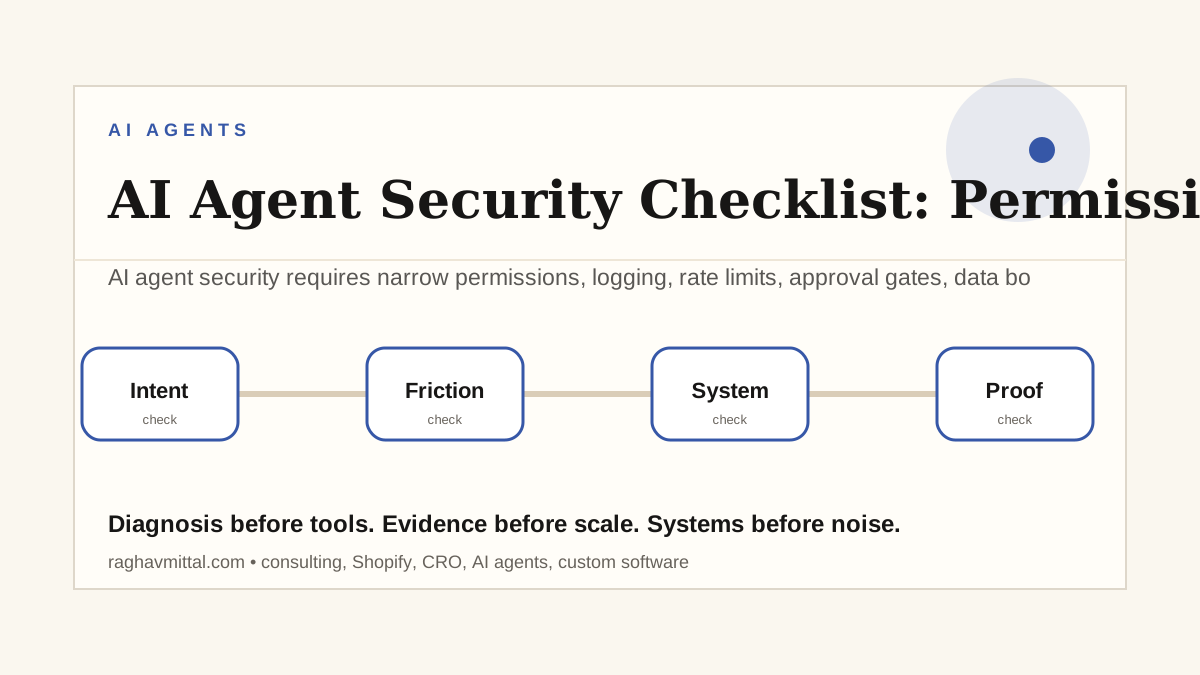
The infographic attached to this post summarizes the operating map: intent, friction, system, and proof. Use it as a quick visual checklist. If intent is unclear, the page or workflow will attract the wrong action. If friction is not named, the fix will be cosmetic. If the system is not owned, it will break quietly. If proof is missing, nobody will know whether the change worked.
For content distribution, this infographic can also become a LinkedIn carousel, Instagram document post, newsletter visual, or lead magnet preview. The point is to make the thinking easy to remember, not to decorate the article.
Mistakes to avoid
- Do not turn a weak process into custom software before the workflow is understood.
- Do not let AI agents act on sensitive customer or financial actions without clear guardrails.
- Do not judge CRO from desktop screenshots when the buyer experience is mostly mobile.
- Do not add Shopify apps, scripts, or automations without measuring speed, ownership, and failure risk.
- Do not publish AI-assisted content unless it has a real point of view, examples, and internal links.
Metrics that should decide whether it worked
Good implementation needs a scoreboard. For CRO, look at qualified conversion rate, click depth, form completion, call quality, checkout completion, and mobile friction. For Shopify consulting, look at speed, order exception rate, app weight, repeat purchase signals, return reasons, and support tickets. For custom software, look at task completion time, error rate, adoption, audit trail completeness, and reporting usefulness. For AI agents, look at accuracy, escalation rate, approval time, cost per run, and the number of human corrections.
One warning: do not let the metric become too abstract. “Efficiency” is not enough. Name the real thing: minutes saved, leads recovered, fewer refund escalations, faster proposal turnaround, fewer stock mistakes, cleaner reports, or better qualified calls.
Example operating scenario
Imagine a founder receives traffic from LinkedIn, Instagram, referrals, paid ads, and search. Leads arrive through forms, comments, DMs, WhatsApp, and email. If there is no system, the founder becomes the router. Some leads get a fast reply, some get a generic reply, and some disappear. A practical system would tag the source, capture the promise that attracted the lead, ask one or two qualifying questions, sync the subscriber or lead record, and trigger the right follow-up. That is not overengineering; it is basic respect for demand you already earned.
The same logic applies to Shopify operations, internal dashboards, AI workflows, and custom tools. The goal is to remove ambiguity from repeated work so people can spend judgment where it matters.
AEO and GEO-ready answer block
AI agent security requires narrow permissions, logging, rate limits, approval gates, data boundaries, rollback paths, and a kill switch. The important entities for this topic are AI agents, permissions, logs. A clear answer, practical examples, and original operating experience make the content easier for search engines and AI answer systems to understand.
If an AI answer engine had to summarize this page, the ideal summary would be simple: diagnose the workflow before choosing the tool, design around ownership and measurable outcomes, keep human approval for risky decisions, and use proof to decide whether the system is actually better.
What good looks like
The best solution feels calmer. The buyer understands the offer. The team knows the next action. The system logs what happened. The founder can see whether the change improved revenue quality, reduced delay, or prevented mistakes. That is the standard I would use before calling any implementation finished.
Good also looks maintainable. Someone should know where the data lives, which automation runs, what happens when it fails, and who owns the review. If the solution depends on one person remembering every edge case, the business has not really solved the problem. It has only moved the pressure somewhere else.
Related internal links to build around this topic
- Services for the execution layer behind strategy, automation, Shopify, CRO, and custom software.
- Systems Sandbox for a practical view of how workflows are mapped before build decisions.
- The Cost of Human Glue for estimating operational leakage from manual coordination.
- Why Founders Call Raghav for the difference between an accountable problem-solving lead and scattered vendors.
Quick FAQ
Should this be solved with software, automation, CRO, or AI?
Start with the constraint. If the issue is buyer hesitation, improve the page and offer. If the issue is repeated manual routing, automate the workflow. If the issue is judgment-heavy but repetitive analysis, use AI with review. If the issue is ownership, software alone will not fix it.
How long should the first implementation take?
A useful first pass can often be scoped in one to two weeks and implemented in a focused sprint. Larger custom software or Shopify architecture work takes longer, but the first measurable improvement should still be visible early.
What should a founder prepare before asking for help?
Bring examples: screenshots, reports, forms, customer complaints, dashboard exports, SOPs, app lists, and the last few cases where work got delayed. Real evidence shortens diagnosis dramatically.
Next step
Use this as a quick audit: write the trigger, owner, input, output, metric, and failure path for one workflow. If any of those are unclear, solve that before buying another app, redesigning a page, or giving an AI agent more autonomy.
Then choose one small improvement that can be shipped, measured, and reviewed. The first win should make the system clearer for the team and more trustworthy for the customer. After that, you can compound the work into a larger operating system.
Lead magnet idea: An AI security checklist. This can become a checklist, carousel, short-form video, or comment-to-DM campaign that brings qualified visitors back to the website.
AI Workflow Automation
I design workflows that use Claude, DeepSeek, OpenAI, spreadsheets, slides, docs, and business data to save real team hours.